Listening Guides / App comparisons
5 Best Free Text to Speech Apps for iPhone in 2026
Compare free text to speech and read aloud apps for iPhone by real limits, offline use, PDFs, voices, and privacy. Includes a five-minute test before you pay.
By AudioPage Editorial · Published · Updated · 13 min read
The best free text to speech app for iPhone depends on what “free” must cover. Start with Apple Read & Speak for occasional on-screen text, AudioPage for a local-first library of up to 10 saved items, ElevenReader for a monthly allowance of expressive cloud voices, NaturalReader for unlimited basic Free Voices on accessible text, or Speechify when you want to evaluate its broader ecosystem before paying. Free limits change, so the comparison below states what each provider published when checked on September 20, 2026.
Quick takeaway: Use Apple’s built-in tools if you only need a page spoken now. Choose a dedicated app when you need PDF or article imports, a saved library, reliable resume position, OCR, or a particular voice. Test one real document before subscribing; a generous quota cannot fix bad reading order.
Free text to speech and read aloud apps at a glance
How we checked: official provider pages and current US App Store listings, source-verified rather than hands-on, last checked September 20, 2026. This guide does not claim laboratory testing of every app. “Offline” means the reading voice can play without requesting new speech from a server, not merely that an app can cache previously generated audio. Prices, trials, and regional availability may differ on your device.
| Option | Best free use | Published free boundary checked September 20, 2026 | Offline and privacy note |
|---|---|---|---|
| Apple Read & Speak | Occasional selected text or whole screens | Built into iOS; no separate app fee | Can use installed voices; no separate cloud account required |
| AudioPage | Mixed PDF, book, article, and text library | Core local playback for up to 10 saved items | Core listening is local after first voice setup |
| ElevenReader | Trying expressive cloud voices and its Explore library | 10 hours of uploaded text-to-audio each month; Explore books and feeds do not consume those hours | Cloud-oriented; offline downloads require Ultra |
| NaturalReader | Accessible text with basic voices | Free Voices have unlimited basic speech; premium voices are capped daily | OCR and premium capabilities have paid boundaries |
| Speechify | Evaluating a mature cross-device reader | 10 voices and 1.5x speed, with in-app purchases for Premium | Offline MP3 downloads require Premium |
This table deliberately avoids declaring a universal winner. A student with scanned worksheets, a commuter with EPUB books, and a person who needs one email spoken have different constraints. If your situation is closer to the commuter, the offline text to speech guide covers the no-network workflow end to end.
1. Apple Read & Speak: best completely free starting point
iPhone already includes Speak Selection, Speak Screen, and the newer Accessibility Reader. Apple’s Read & Speak instructions show how to enable them under Settings → Accessibility → Read & Speak. Speak Selection reads highlighted words; Speak Screen reads the screen after a two-finger swipe from the top. Controls can pause, change rate, or move through content.
This is the right first option for an email, a note, a compatible web page, or a document you will hear once. It is already on the phone, uses Apple’s installed voices, and does not require building another library.
The limitation is workflow, not the absence of speech. Read & Speak does not turn unrelated PDFs, EPUBs, scans, and articles into a named listening queue. A web page may expose navigation labels. An image-only PDF still needs OCR. If you regularly return to long documents, a dedicated reader saves organizational work.
Free verdict: genuinely included with iOS. Best for light, immediate reading; not a full document-listening library.
2. AudioPage: best free local-first document library
AudioPage is designed around bringing reading material into one iPhone listening library. It supports PDF, EPUB, DOCX, web articles, pasted text, photos/screenshots, and camera scans, with 26 reading and conversational voices across English, French, German, Spanish, Portuguese, and Italian.
Free includes core local playback for up to 10 saved items. The first voice setup needs internet to obtain the required resources; after setup, supported text handling, voice generation, and core playback run on the device and can continue offline. That is useful for private notes, travel, or avoiding a cloud request for every spoken paragraph.
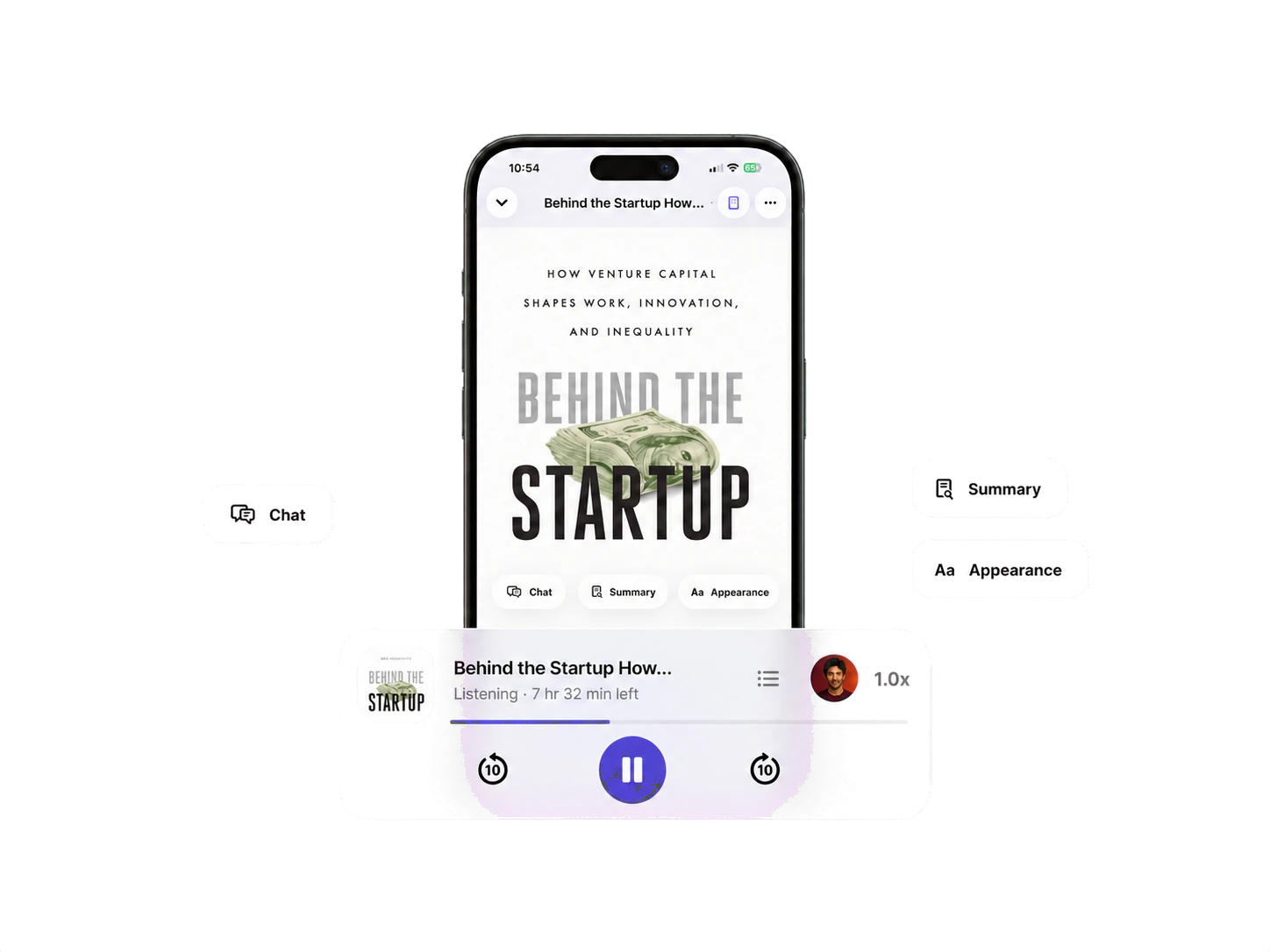
The boundary is clear: advanced import tools such as image OCR and camera scans are eligible local features available with Lifetime Offline or Pro. Lifetime Offline removes the item limit and unlocks eligible local reading features. Pro adds document-grounded cloud summaries, document chat, and optional private sync. Those connected features run only when selected and are not included in Free or Lifetime Offline.
AudioPage is not an MP3 exporter or audiobook-publishing studio. It is an iPhone reading and listening app. If ten saved items are enough, the free tier can be a continuing workflow rather than a timed voice demo. If you need unlimited eligible local imports, check purchase and restore guidance; the US App Store listing shows the current in-app purchase names.
Free verdict: best fit here for a small, mixed-format, local-first library. Watch for the 10-item cap and paid OCR boundary.
3. ElevenReader: best free monthly cloud-voice allowance
ElevenReader focuses on expressive ElevenLabs voices, uploaded documents, articles, and a catalog of books and feeds. Its official pricing page states that the Free plan includes 10 hours of text-to-audio each month, described elsewhere as roughly a 400-page book.
The provider’s hours documentation says listening to free books or feeds in the Explore library does not consume uploaded-text hours and tells users to check the app for the allowance attached to their account. That distinction matters: “free books” and “free conversion of your own 400-page PDF” are not the same meter.
Pricing is now explicit rather than “currently free.” Offline downloads, custom voices, and unlimited imports require Ultra at $11 per month or $99 per year, and ElevenReader does not offer in-app audio export. Treat it as a cloud-first option: uploaded private documents deserve a privacy-policy review before import.
Free verdict: a substantial, clearly published monthly trial for cloud voices. Best when voice expression matters more than offline generation or a permanently unmetered workflow.
4. NaturalReader: best free basic voices for accessible text
NaturalReader separates its basic Free Voices from premium voices and paid document features. Its current help pages describe free users with unlimited Free Voices for supported accessible text, with premium voices capped by a daily character allowance instead of an unlimited pass. The paid tiers also changed in 2026: Lite, Plus, and Pro replaced the old Premium naming, with published monthly and yearly prices.
“Accessible” is the decisive word. The provider says OCR for inaccessible PDFs, scanned documents, images, or screenshots is a paid-plan feature. An ordinary PDF with a valid text layer can fit the basic free workflow; a photographed worksheet may not. The current product also spans web and mobile, which can help people who move between devices, but cloud features require evaluating account and document handling.
Do not confuse unlimited basic playback with unlimited access to every voice, OCR, AI tool, or MP3 conversion. NaturalReader’s own pages maintain separate limits and licenses for those functions. Paid tiers unlock MP3 export at a monthly character allowance for personal use.
Free verdict: the strongest published unmetered basic-voice offer in this list for accessible text. Test the exact file because OCR and premium voices are separate.
5. Speechify: best for evaluating a broad reader ecosystem
Speechify supports PDFs, documents, articles, and a wide set of platforms. Its pricing page lists a free start with 10 voices and 1.5x speed, while Premium at $29 per month on the web unlocks the larger voice catalog and offline MP3 downloads. The US App Store also showed an annual in-app purchase of $139.99 when checked on September 20, 2026.
That makes the free boundary legible, which was not always true in older reviews: free covers basic voices and speed, and paid covers catalog breadth, faster playback, and downloads. Before importing a large book, confirm four facts in the current in-app plan screen: included voices, maximum speed, any time or character allowance, and which offline features require Premium.
Speechify is worth evaluating when you care about its cross-device ecosystem and established reader workflow. If the renewal price is the deciding factor for you, our Speechify pricing breakdown tracks what the plans actually include.
Free verdict: useful to try, but verify today’s boundary inside the app. Do not assume a free download makes premium voices or long-document listening free.
One popular app we did not count as free TTS
Matter is a strong read-later organizer, but its US App Store listing places HD text-to-speech in Matter Premium. Free read-later features are not free speech playback. That distinction prevents a common comparison error: a free app with paid speech is not the same as free text to speech.
Legacy talking-character software is a separate story: the original BonziBuddy used Microsoft Agent speech and is unsafe to install today. Our BonziBuddy text-to-speech guide explains that era and how to recreate it safely.
Run this five-minute test before choosing
Use the same material in every app. Do not compare a clean blog post in one app with a crooked scan in another.
- One normal paragraph: checks voice clarity and highlighting.
- One proper name: checks pronunciation controls.
- One two-column PDF page: exposes reading-order problems.
- One image-only page: reveals whether OCR exists and which plan includes it.
- Airplane Mode after setup: distinguishes local generation from a cloud requirement.
Score each candidate from zero to two on import success, reading order, resume behavior, voice comfort, and offline playback. Ten is the maximum. Then add a separate “free fit” result:
- Pass: your expected weekly use fits the published free boundary.
- Conditional: it fits only if you rotate or delete saved items.
- Fail: the voice, OCR, speed, or offline function you need is paid.
The score is more useful than a generic ranking because it uses your actual document and your non-negotiable constraint.
What changes when free runs out
Every free tier in this guide has a paid continuation, and the shape of that payment matters as much as the size.
| Option | What paid adds | Published price checked September 20, 2026 |
|---|---|---|
| AudioPage | Lifetime Offline removes the 10-item cap for eligible local features; Pro adds cloud summary, chat, and sync | Lifetime Offline $149.99 one-time; Pro $9.99/month or $59.99/year |
| ElevenReader | Ultra adds offline downloads, custom voices, and unlimited imports | $11/month or $99/year |
| NaturalReader | Lite, Plus, and Pro add premium voices, OCR, AI tools, and MP3 export | Lite $13.90/month or $79/year; Plus $20.90 or $119; Pro $25.90 or $159 |
| Speechify | Premium adds the larger voice catalog, faster speed, and offline MP3 downloads | $29/month on the web; annual in-app purchase $139.99 |
Two patterns are worth noting. First, one-time pricing is now rare outside Speech Central’s $9.99 Pro upgrade and AudioPage’s Lifetime Offline option; most readers moved to subscriptions. Second, cloud features are the usual dividing line: local playback tends to survive on cheaper plans, while OCR, AI tools, and downloads sit behind payment. Decide which side of that line your weekly reading falls on before you subscribe. For AudioPage specifically, purchase and restore guidance explains how the plans are structured.
Free does not remove the privacy question
Local system voices and local generation reduce how much text must leave the phone for speech. Cloud voices can sound different and enable cross-device features, but typically need document text sent to a service. Neither model is automatically right for every person.
Before uploading a medical letter, unpublished manuscript, workplace report, or school record, check whether the app processes speech locally, whether imported text is retained, how deletion works, and whether sync is optional. Review iPhone’s Privacy Nutrition Label and Settings → Privacy & Security → App Privacy Report as additional evidence, not as a substitute for the provider’s privacy policy.
AudioPage keeps supported import, recognition, voice generation, and core playback local-first. Selecting Pro summary, document chat, or sync intentionally invokes connected services. A cloud-oriented reader should be evaluated under its own published policy.
Troubleshooting common free-plan problems
The app says a PDF has no readable text
Try selecting a sentence. If individual words cannot be selected, the PDF may contain page images rather than text. OCR is required, and that feature may be paid even if regular playback is free. Use the scanned-PDF OCR guide before judging voice quality, and if the file is a clean text PDF, how to read a PDF aloud on iPhone covers the direct route.
Playback reads menus, headers, or columns out of order
The parser is receiving a confusing document structure. Try a reader/text view, crop and OCR one column, or request an accessible PDF or EPUB from the publisher. A premium voice will pronounce the same broken order more pleasantly; it will not repair it.
The “free” voice changed or the allowance disappeared
Check the app’s current plan screen and the provider’s dated support page. Trials, regional offers, and quotas change. Do not rely on an old review screenshot. This article records the public terms found on September 20, 2026 and should be rechecked before a purchase.
Playback stops offline
Download the required voice or item while connected, then test in Airplane Mode. In AudioPage, finish first voice setup and open your document before travel. ElevenReader’s public materials associate offline downloads with Ultra, while other apps may cache only already-generated sections.
You reached AudioPage’s 10-item limit
Delete finished items if you want to stay on Free. If you need a permanent larger local library, Lifetime Offline removes the cap for eligible local features; Pro adds connected document AI and optional sync. See AudioPage purchase support for the current route.
How a dedicated listening library works
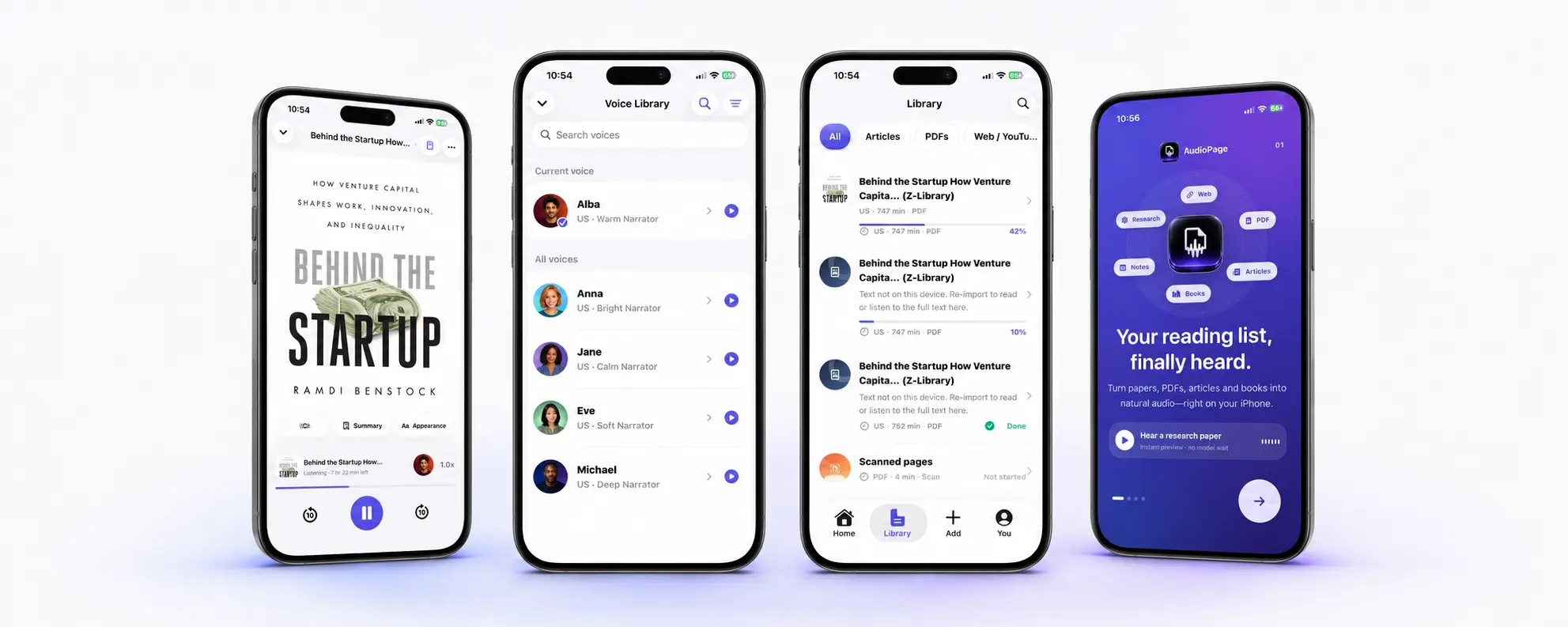
For a broader feature-first comparison, read the best text to speech apps for iPhone. If you are choosing between saved articles and a speech-focused library, the article reader apps comparison explains where each tool stops being the right one.
Frequently asked questions
What is the best completely free text-to-speech option on iPhone?
Apple Read & Speak is the safest completely free starting point because it is built into iOS and has no separate subscription, although it does not create a dedicated document library.
Is there a free text-to-speech app with no listening limit?
NaturalReader says its basic Free Voices can read accessible uploaded text without a usage limit, but premium voices, OCR, and other features have separate limits or paid requirements.
Can a free iPhone text-to-speech app read PDFs?
Yes, but results depend on the PDF. Accessible PDFs with selectable text are easier; scanned PDFs need OCR, which may be a paid feature even when ordinary text playback is free.
Do free text-to-speech apps work offline?
Some do, but offline behavior depends on the voice and app. Apple can use downloaded system voices, while AudioPage runs core playback locally after its first voice setup; cloud voice services require a connection unless they offer downloads.
Which iPhone apps will read to you for free?
Apple Read & Speak reads selected text or the screen at no cost, and AudioPage’s free tier reads up to 10 saved documents locally after voice setup. NaturalReader’s basic Free Voices are unlimited for accessible text, while premium voices and OCR may be paid.
Sources and further reading
- Apple Support: Hear iPhone speak the screen and selected text (checked 2026-09-20)
- AudioPage on the US App Store (checked 2026-09-20)
- ElevenReader pricing and free hours (checked 2026-09-20)
- ElevenLabs Help: How ElevenReader hours work (checked 2026-09-20)
- NaturalReader Help: Plans and Pricing (Personal Version) (checked 2026-09-20)
- Speechify: Text to speech pricing (checked 2026-09-20)
- Matter App Store listing: Free and Premium feature boundaries (checked 2026-07-17)
About AudioPage Editorial
Guides are produced by the team building AudioPage. Product claims are checked against the current app and repository; third-party features and prices are checked against official sources on the date shown. Read our editorial standards and corrections policy.
Turn the next document into listening time
AudioPage keeps core reading local-first on iPhone. Review the current plan boundaries, then choose the listening setup that fits your documents.