Listening Guides / App comparisons
Best Text to Speech App for iPhone: 7 Apps Compared
Compare the best text to speech apps for iPhone and iOS in 2026: PDFs, scans, offline listening, accessibility, AI voices, free limits, and pricing.
By AudioPage Editorial · Published · Updated · 13 min read
The best text to speech app for iPhone is the one that fits the material you actually read. AudioPage is a strong fit for local-first documents and offline listening; Apple Read & Speak is best for occasional free use; Speechify offers a broad multi-platform ecosystem; ElevenReader emphasizes expressive cloud voices; NaturalReader, Voice Dream Reader, and Speech Central serve more specialized OCR, accessibility, or power-user needs.
Quick takeaway: Start with the input, not the voice. A TTS app that narrates a perfect demo but scrambles your two-column PDF, loses your place, or stops offline is the wrong reader for you.
Our comparison method
This guide compares officially documented capabilities and current US App Store information checked on September 20, 2026. It does not claim that we laboratory-tested every app. Where an app’s real-world behavior depends on a document, voice, plan, or network state, we tell you how to test it rather than manufacture a score.
A fair evaluation has six parts:
- Input fit (25%) — Can it accept the PDF, EPUB, DOCX, article, pasted text, or scan you use?
- Extraction quality (20%) — Does it preserve paragraph and column order, and is OCR available when needed?
- Reliability and offline use (20%) — Does playback continue after the screen locks or the network disappears?
- Listening controls (15%) — Are speed, highlighting, navigation, pronunciation, and resume useful?
- Privacy clarity (10%) — Can you tell what stays on the device and what is uploaded?
- Value (10%) — Do free limits and paid renewals match your weekly listening?
Use those weights as a worksheet. A dyslexic student may weight highlighting and OCR more heavily; a commuter may prioritize offline playback. Adjust the weights for your situation rather than copying any publisher’s ranking. Still deciding whether to pay at all? The free iPhone comparison covers free options, the student comparison narrows the list to coursework, and the AudioPen vs AudioPage comparison covers voice notes versus document listening.
What each app can do (source-verified)
Every cell reflects the vendor documentation and US App Store listings cited at the end of this article. “Not documented” means we could not confirm the behavior from an official source; it does not prove the app lacks the feature. Verify on your own device before paying.
| App | Best for | OCR and scans | Reading order on complex PDFs | Highlighting | Resume position | Lock-screen playback |
|---|---|---|---|---|---|---|
| AudioPage | Local-first iPhone document library | Yes, on-device for scans and photos | Multi-column order acknowledged as a failure mode; no automatic repair | Yes, sentence highlighting | Yes | Yes, background audio and Lock Screen controls |
| Apple Read & Speak | Quick, free, no-download reading | No; Live Text handles photos separately | Not documented | Yes, adjustable highlight style | Not documented; no saved queue | Not documented |
| Speechify | Broad cross-platform ecosystem | Yes, Scan and Listen on Premium | Not documented | Yes, word and sentence | Bookmarks documented | Not documented |
| ElevenReader | Expressive cloud voices | Yes, scanned pages and documents | Skips headers, footers, and filler on Ultra; columns not documented | Yes | Yes, bookmarks | Not documented |
| NaturalReader | OCR plus AI extras | Yes, camera scanner on paid plans | AI filter skips page numbers and tables on paid plans | Yes, with captions | Yes, across app, web, and desktop | Not documented |
| Voice Dream Reader | Accessibility and reading control | Yes, on-device scanner for Latin alphabets | Automatically skips headers and footers | Yes, spoken-word highlighting | Yes, reading locations sync via iCloud Drive | Yes, documented background playback |
| Speech Central | Formats and power users | Yes, including two-column scans | Yes, documented reading-order cleanup | Yes, customizable | Yes, position syncs across devices | Not documented |
| App | On-device vs cloud | Audio export | Platforms | Free limit | Billing (published prices checked September 20, 2026) |
|---|---|---|---|---|---|
| AudioPage | Core speech local after voice setup; Pro AI and sync use cloud | No; not an MP3 exporter | iPhone and iPad | 10 saved items | Lifetime Offline $149.99 one-time; Pro $9.99/month or $59.99/year |
| Apple Read & Speak | Speech on-device; enhanced voices download over Wi-Fi | No | iOS, iPadOS, macOS | Built in | Included with the device |
| Speechify | iOS voices plus a cloud catalog; AI tools online | Yes, offline MP3 on Premium | iOS, Android, desktop, web | 10 voices, 1.5x speed | Premium $29/month on the web; annual in-app purchase $139.99 |
| ElevenReader | Cloud speech; offline downloads are Ultra-only | No | iOS, Android, web | 10 hours per month | Ultra $11/month or $99/year |
| NaturalReader | Free uses system voices; paid AI voices are cloud | Yes, paid plans, 1M characters per month | iOS, Android, web | Unlimited Lite voices; premium characters capped daily | Lite $13.90/month or $79/year; Plus $20.90 or $119; Pro $25.90 or $159 |
| Voice Dream Reader | Voices and scanner on-device; AI features cloud | Not documented | iPhone, iPad, Apple Watch | Free trial, then subscription required | $4.99/month or $79.99/year |
| Speech Central | Apple voices offline; optional cloud voices via your own API keys | Yes | iOS, iPadOS, watchOS, tvOS, visionOS | About 2 short items per day or 1 long item per month | Pro $9.99 one-time |
How to choose a text to speech app for iPhone
Match the need to the app before comparing voices. A voice you love cannot rescue a workflow that loses your files.
| Your need | Start with | Why | Test before paying |
|---|---|---|---|
| Short selectable text with no setup | Apple Read & Speak | Free, already installed, works in most apps | Whether Speak Screen reads the right text in your app |
| Recurring PDFs, books, and offline listening | AudioPage | Local-first library with resume and lock-screen controls | Your two-column PDF and your chosen voice in Airplane Mode |
| One ecosystem across phone, browser, and desktop | Speechify | Broad input support and cross-platform apps | The renewal price and offline voice behavior inside the app |
| The most expressive voices | ElevenReader | Cloud voice quality and language breadth | That you accept cloud processing and the monthly hour limit |
| OCR plus AI summaries, quizzes, or podcasts | NaturalReader | Camera input plus transformation features | Which tier unlocks OCR and MP3 export |
| Precise accessibility controls | Voice Dream Reader or Speech Central | Fine-grained reading settings and format coverage | The exact navigation and voice you need on your own file |
Best iPhone text to speech app for local-first documents: AudioPage
AudioPage turns imported reading into a saved iPhone listening library. It supports PDF, EPUB, DOCX, web articles, pasted text, camera scans, and photos or screenshots. Its 26 reading and conversational voices cover English, French, German, Spanish, Portuguese, and Italian.
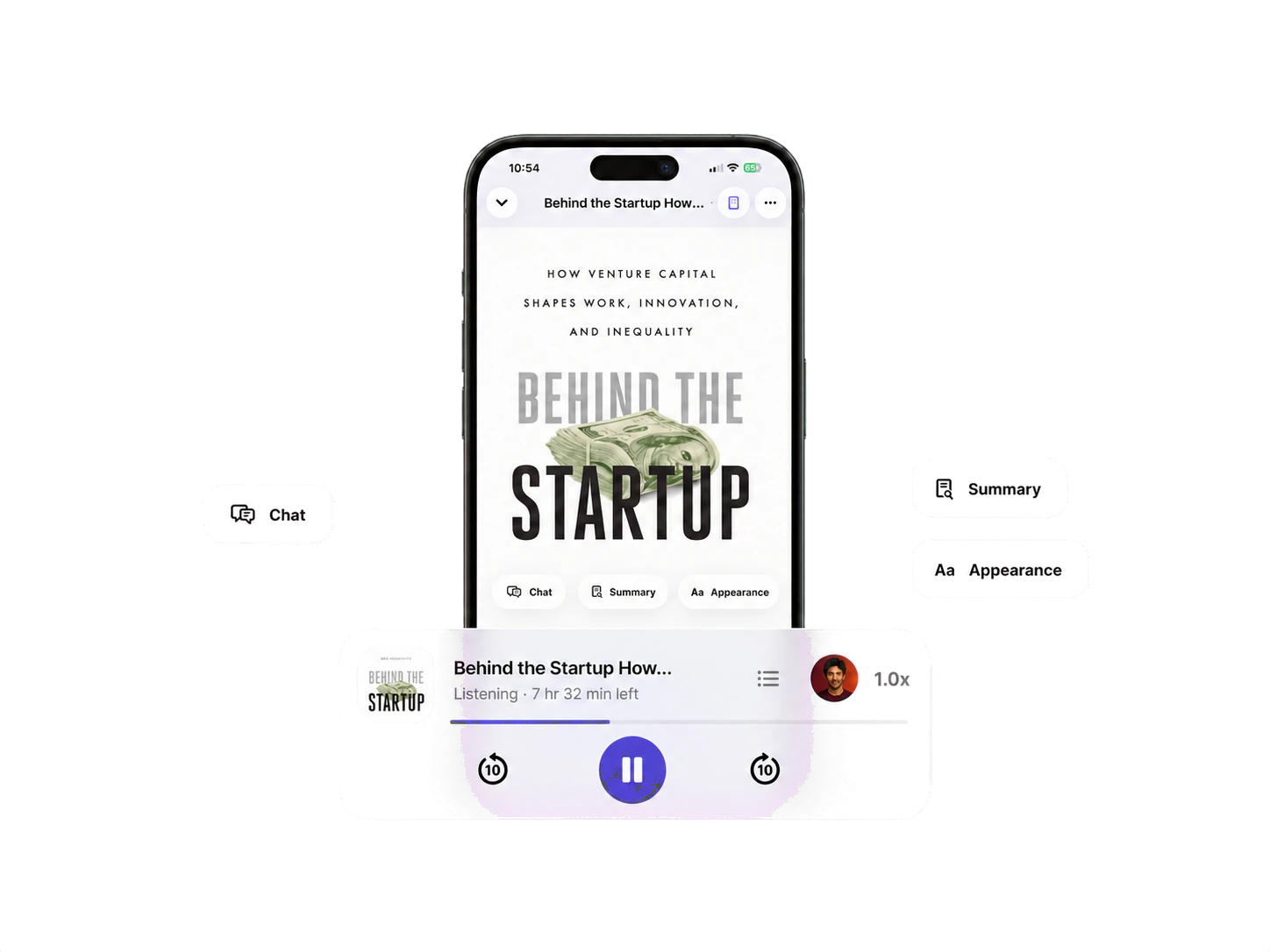
Its clearest advantage is architectural: supported importing, text recognition, speech generation, and core playback are local-first. The first setup for a voice needs an internet connection to obtain its resources; normal playback can then continue offline. The free plan allows up to 10 saved items. A one-time Lifetime Offline purchase covers unlimited eligible local reading features. Pro adds document-grounded summary, document chat, and optional sync; those connected features use cloud services only when you choose them.
Choose AudioPage when you want a dedicated library with an explicit local listening path and a one-time option for eligible offline features. Skip it if your job is creating MP3 voiceovers, publishing audiobooks, or working across Android and a browser.
The PDF read-aloud guide shows how to distinguish a text PDF from a scan. Current plan details appear through AudioPage support and the US App Store listing.
Best free iOS text to speech: Apple Read & Speak
iPhone already includes Speak Screen, Speak Selection, Accessibility Reader, and VoiceOver. Apple’s Read & Speak guide explains how to enable the controls, choose voices, adjust rate, highlight spoken text, detect languages, and define pronunciations.
The built-in route is ideal for a short email, Notes page, Safari article, or selectable-text PDF. You avoid another account and subscription. Apple system voices can be downloaded for offline use. For web articles specifically, our web page listening guide compares Safari’s route with a saved listening queue.
It is less suited to a persistent document queue: a cluttered web page may include navigation text, and a photographed page still requires text recognition. Graduate to a document reader only when the workflow becomes repetitive.
Best broad ecosystem: Speechify
Speechify’s official iOS page advertises iPhone, Android, web, browser extensions, document and article listening, scanning, speed controls, and offline downloads for Premium users. Its Voice-over catalog is marketed in the hundreds to thousands depending on the page, and the pricing page listed Premium at $29 per month when checked on September 20, 2026, while the US App Store showed an annual in-app purchase of $139.99. The free tier includes 10 voices and caps speed at 1.5x.
This breadth is the appeal: one ecosystem across a phone, browser, and desktop.
Offers vary by plan and promotion, so check renewal frequency and included limits on the final Apple purchase sheet. If pricing or local processing is the reason you are looking elsewhere, compare our seven Speechify alternatives.
Best for expressive cloud voices: ElevenReader
ElevenLabs says ElevenReader narrates articles, EPUBs, PDFs, and other text with its speech models in 32 languages. Official availability information lists iPhone and iPad with iOS or iPadOS 17 or later, while the US App Store listing required iOS 18 when checked on September 20, 2026.
Choose it when voice expressiveness and language breadth outrank local-only processing.
Pricing is now explicit rather than “currently free”: the free plan includes 10 hours per month, and offline downloads and custom voices require Ultra at $11 per month or $99 per year, per ElevenReader pricing. If you need no-network listening or handle sensitive documents, test the exact storage and download behavior before committing.
Best for OCR and cross-platform AI extras: NaturalReader
NaturalReader’s US App Store listing advertises PDF, Word, PowerPoint, web, cloud file, DRM-free EPUB, image, and camera-scanner input. It also lists synchronized highlighting, annotations, MP3 downloads, many AI voices, voice customization, AI recaps, quizzes, podcasts, and cross-platform history.
It fits readers who want speech plus transformation features more than a strictly local workflow.
The tradeoff is tier complexity, and the tiers changed in 2026. NaturalReader’s help center pricing listed Lite at $13.90 per month or $79 per year, Plus at $20.90 or $119, and Pro at $25.90 or $159 when checked on September 20, 2026. The free plan keeps unlimited Lite voices with capped premium characters per day and no MP3 export. Start free with one representative document before choosing a tier.
Best for granular accessibility controls: Voice Dream Reader
Voice Dream Reader focuses on the reading experience: document navigation, synchronized text, typography, pronunciation, and voice choice.
Its pricing history can make old comparisons misleading. The current US listing states that a subscription is required, with a free trial for new users and in-app purchases at $4.99 per month or $79.99 per year when checked on September 20, 2026. The official 2024 pricing update documents the subscription transition and special treatment for earlier one-time purchasers. A new buyer should ignore legacy reviews that quote an old one-time price and inspect the present offer.
Choose it when precise reading adjustments, background playback, and accessible workflows matter more than a minimal setup. Test the exact navigation and voice you need on your own file.
Best for formats and Apple power users: Speech Central
Speech Central’s official site and App Store listing document an unusually wide set of inputs: PDF, scanned PDF with two-column support, EPUB, DOCX, PowerPoint, OpenOffice, HTML, TXT, RTF, Markdown, web pages, and RSS. It also advertises annotations, reading-order cleanup for headers and footnotes, audio export, CarPlay, Apple Watch, ecosystem sync, and accessibility profiles.
It uses Apple system voices offline and can optionally connect cloud AI services with your own API credentials.
The free version is limited to roughly two short items per day or one long item per month, with a $9.99 one-time Pro upgrade (September 20, 2026). Separate licenses may be needed outside iOS and watchOS; price the whole platform if you use a Mac or PC.
The 15-minute real-document test
Use the same material in each app so voice quality does not distract from workflow quality.
Sample inputs
- PDF: a five-page report with a heading, footer, table, and two-column page.
- Web: a long article with navigation, captions, and an email signup box.
- Image: a well-lit photo of a printed recipe containing quantities.
- Plain text: 500 words containing names, dates, abbreviations, and parentheses.
Scorecard
| Test | 0 points | 1 point | 2 points |
|---|---|---|---|
| Import | Fails | Needs conversion | Opens directly |
| Reading order | Frequently wrong | One repair needed | Correct throughout sample |
| Resume | Loses position | Returns near position | Returns exactly |
| Offline | Will not play | Only some voices work | Chosen voice and sample work |
| Controls | Missing essentials | Usable | Clear speed, skip, and highlight |
| Price clarity | Renewal unclear | Limits found with effort | Limits and renewal explicit |
Run Airplane Mode only after downloading any required voice. Stop mid-paragraph, close the app, wait two minutes, and reopen it. Lock the screen and use headphones. Then check whether a “free” app limits characters, minutes, documents, voices, OCR, or exports.
This is not a benchmark of every possible file; it is a disciplined way to choose for your recurring inputs. The listening guides hub collects the workflow pages this test is based on.
Troubleshooting before you blame the app
A PDF reads in the wrong order
Check whether the page has multiple columns or a broken text layer. Try text view, OCR, or an accessible EPUB/DOCX version. If selection jumps across columns, a different voice will not fix the structure. Our scanned PDF OCR guide walks through the repair options in order.
A premium voice stops without Wi-Fi
Some services stream cloud speech even when documents are stored locally. Download the voice if the product supports it, then test again. Do not equate “offline documents” with “offline voice generation.”
Playback becomes silent when the screen locks
Check media volume, Bluetooth output, and the app’s background playback setting. If Apple Read & Speak is the only method failing in a third-party app, try the same passage in Files or Notes to isolate the source.
The camera scan says numbers incorrectly
Review the recognized text before listening. OCR commonly confuses 0/O, 1/l, decimal points, and minus signs. Never rely on unverified narration for a dose, contract, or account number. The photo to speech workflow shows how to verify recognition first.
Frequently asked questions
What is the best text to speech app for iPhone?
There is no single best app for every job. Use Apple Read & Speak for occasional text, AudioPage for local-first document listening, Speechify for a broad ecosystem, ElevenReader for expressive cloud voices, or a specialist reader for deeper controls.
What is the best iPhone app to read PDFs aloud?
Choose a reader that preserves text order, resume position, and offline playback for your files. AudioPage, Speechify, NaturalReader, Voice Dream Reader, and Speech Central all target PDF listening in different ways.
Does iPhone have free text-to-speech built in?
Yes. Read & Speak includes Speak Screen and Speak Selection, and VoiceOver is a full screen reader. These Apple features are the right first test before downloading another app.
Can text-to-speech apps work without internet?
Some can, but offline support may depend on the selected voice and whether it was downloaded. AudioPage’s core listening runs locally after first voice setup; connected Pro AI and optional sync still require internet.
Are text-to-speech apps the same as AI voice generators?
No. A reader prioritizes importing, navigating, highlighting, and resuming documents. A voice generator prioritizes producing audio files or voiceovers, licensing, timing, and editing.
Sources and further reading
- Apple Support: Hear iPhone speak the screen and selected text (checked 2026-09-20)
- Apple Support: Adjust voice and speed for VoiceOver and Speak Screen (checked 2026-09-20)
- AudioPage on the US App Store (checked 2026-09-20)
- AudioPage Support (checked 2026-09-20)
- Speechify pricing (checked 2026-09-20)
- Speechify for iOS (checked 2026-09-20)
- ElevenLabs Help: What is ElevenReader? (checked 2026-09-20)
- ElevenReader pricing (checked 2026-09-20)
- NaturalReader Help: Plans and Pricing (Personal Version) (checked 2026-09-20)
- Voice Dream Reader on the US App Store (checked 2026-09-20)
- Speech Central official site (checked 2026-09-20)
- Speech Central on the US App Store (checked 2026-09-20)
About AudioPage Editorial
Guides are produced by the team building AudioPage. Product claims are checked against the current app and repository; third-party features and prices are checked against official sources on the date shown. Read our editorial standards and corrections policy.
Turn the next document into listening time
AudioPage keeps core reading local-first on iPhone. Review the current plan boundaries, then choose the listening setup that fits your documents.