Listening Guides / App comparisons
7 Best Speechify Alternatives for iPhone in 2026
Compare seven Speechify alternatives for iPhone by offline use, PDFs, web articles, voices, privacy, and pricing model using current official sources.
By AudioPage Editorial · Published · Updated · 14 min read
The best Speechify alternative depends on why you want to switch. For private offline document listening, consider AudioPage. For expressive cloud voices, try ElevenReader or NaturalReader. For deep reading controls, compare Voice Dream Reader and Speech Central. For web articles and a read-later inbox, examine Matter. For occasional on-screen text, Apple’s built-in Read & Speak may be all you need.
Quick takeaway: Do not choose from a voice demo alone. Import one real PDF, one web article, and one scan; test resume position, locked-screen playback, offline behavior, and the exact paid limit. Those five checks reveal more than a long feature list.
How this comparison was made
This is a source-verified comparison, not a claim of hands-on testing. Features, compatibility, and pricing models were checked against official product help pages and US App Store listings on July 17, 2026. App offers change by country, account, and promotion; confirm the checkout screen before paying.
Speechify’s official iOS page describes text-to-speech across mobile, web, and browser extensions, while its current US App Store listing advertises PDFs, documents, articles, scanning, many voices, and in-app purchases. That breadth is the baseline. The alternatives below are ranked by distinct use case—not by an invented universal score.
We considered:
- supported input types, especially PDF, EPUB, DOCX, articles, and scans;
- local or offline listening and whether a voice needs pre-downloading;
- playback, highlighting, navigation, and resume workflow;
- cloud dependence and privacy boundaries;
- free access, subscription, or one-time purchase structure;
- iPhone compatibility and official support documentation.
| Alternative | Best fit | Offline position | Pricing approach, checked July 17, 2026 | Important caveat |
|---|---|---|---|---|
| Apple Read & Speak | Occasional on-screen text | Downloaded Apple voices can work offline | Included with iPhone | Not a saved document-listening library |
| AudioPage | Local-first PDF, book, article, and scan listening | Core playback local after first voice setup | Free; Lifetime Offline; Pro for connected AI/sync | iPhone-first; not an audio-export studio |
| ElevenReader | Expressive cloud narration and broad languages | Do not assume every voice is offline | Official help says currently free | Requires iOS 17; service terms can change |
| NaturalReader | Many cloud voices, OCR, and cross-platform use | Depends on feature and voice | Free download plus tiered in-app plans | Higher-tier voices and AI features have plan limits |
| Voice Dream Reader | Detailed reading customization | Known for device/system voice workflows; verify chosen voice | Free download with subscriptions/IAP | Current offer varies by storefront |
| Speech Central | Format breadth, study tools, Apple ecosystem | Advertises Apple system voices offline | Free daily limit plus Pro upgrade | Separate licenses may apply on other platforms |
| Matter | Web articles, newsletters, RSS, and read-later organization | App listing says saved reading is offline by default | Free service plus Premium | HD text-to-speech is listed as a Premium feature |
1. Apple Read & Speak: best when you do not need another app
Before replacing one subscription with another, test what is already installed. In Settings → Accessibility → Read & Speak, enable Speak Screen or Speak Selection. Apple’s current guide explains the two-finger swipe for speaking the screen, the playback controller, highlighting, voices, language detection, rate, and custom pronunciations.
This works well for a short Safari article, email, Notes page, or correctly structured PDF. Accessibility Reader can also present supported text in a customizable full-screen view.
The tradeoff is workflow. Read & Speak does not turn disparate PDFs and articles into a listening library with titles, persistent document organization, and app-specific resume behavior. Web pages can expose navigation labels or unrelated text. Scanned pages still need OCR. It is the correct free first choice for light use, not a direct replica of Speechify’s library.
2. AudioPage: best for local-first iPhone document listening
AudioPage imports PDF, EPUB, DOCX, web articles, pasted text, photos/screenshots, and camera scans. It offers 26 reading and conversational voices across English, French, German, Spanish, Portuguese, and Italian. The design goal is a quiet iPhone library where imported reading becomes a resumable listening item.
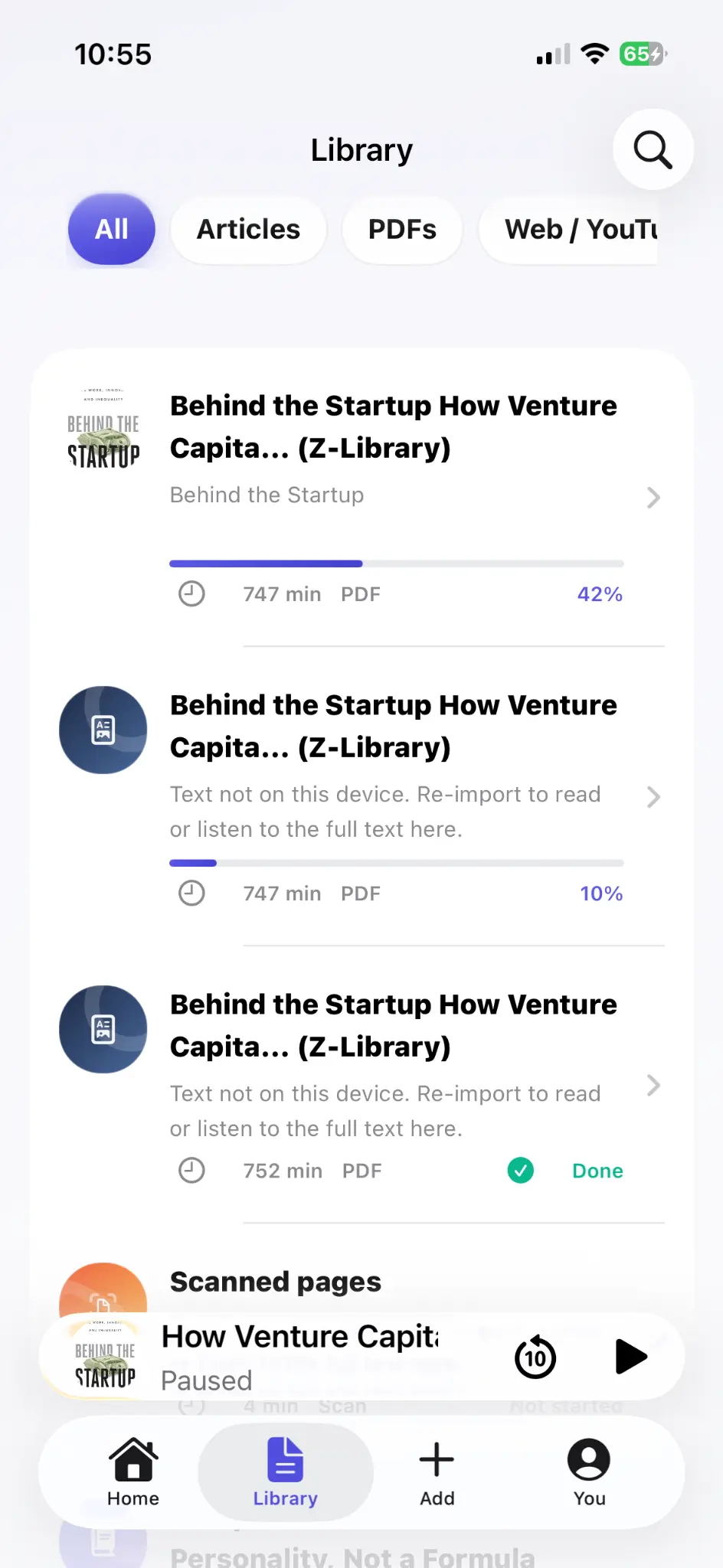
The defining difference is the boundary between local listening and connected features. Supported import, text handling, speech generation, and core playback are local-first. The first voice setup needs internet; afterward, core playback can continue offline. Free supports up to 10 saved items. Lifetime Offline unlocks unlimited eligible local reading features with a one-time purchase. Pro adds document-grounded cloud summaries, document chat, and optional sync, and those cloud features run only when selected.
Choose it if subscription avoidance, offline listening, and an explicit local path matter more than celebrity voices or desktop/browser-extension coverage. Do not choose it if you need MP3 export, audiobook publishing, Android, or a web-wide browser extension: AudioPage does not claim those jobs.
See how to read a PDF aloud on iPhone for a complete import and OCR decision tree. Pricing is intentionally not hard-coded here; check AudioPage plans and purchase support for the current route when the public listing is available.
3. ElevenReader: best for voice expression and language breadth
ElevenLabs says ElevenReader reads articles, EPUBs, PDFs, and other text using its voice technology across 32 languages. Its availability page lists iPhone and iPad support with iOS/iPadOS 17 or later, plus Android and web access.
The official ElevenLabs help center said ElevenReader was currently free when checked on July 17, 2026. “Free today” should not be treated as a lifetime guarantee: cloud inference costs, quotas, and product packaging can change. Check limits on the exact account you create.
Choose ElevenReader when narration quality and multilingual choice come before offline certainty. It also has a publisher/library direction, which may appeal if you want to discover content as well as import it. If your non-negotiable is fully local processing, confirm the current privacy and download behavior before committing a large private library.
4. NaturalReader: best for cross-platform AI features and OCR
NaturalReader’s current US App Store listing describes PDF, Word, PowerPoint, DRM-free EPUB, image, camera OCR, cloud-file, and webpage support. It also advertises cross-platform history, synchronized highlighting, annotations, MP3 downloads, AI recaps, quizzes, podcasts, and voice options.
That makes NaturalReader broader than a simple read-aloud app. It is especially relevant when you move between iPhone and a browser, need OCR, or explicitly need audio-file export—something AudioPage does not offer.
The caveat is packaging. On July 17, 2026, the US listing showed a free download and several monthly/yearly in-app tiers, including Premium, Plus, and Pro entries. The most attractive voices and AI features may sit behind different allowances. Compare the plan’s voice minutes and exports against your actual weekly use rather than assuming “unlimited” from the free button.
5. Voice Dream Reader: best for granular reading control
Voice Dream Reader is a long-running Apple-platform document reader focused on accessibility and customizable reading. Its official site positions it as a text-to-speech reader, and its App Store presence lists broad language support and subscription options.
It is a sensible shortlist choice for readers who care about typography, highlighting, pronunciation, navigation, and detailed control more than a minimal interface. It is also familiar to many accessibility-focused users.
The purchase history deserves attention. Voice Dream’s own subscription update documents its move to subscription pricing in 2024 and special handling for earlier one-time purchasers. New customers should judge the current storefront offer, not an old review that mentions a legacy one-time price. Verify whether a desired premium voice is included, separately purchased, or dependent on an Apple system download.
6. Speech Central: best for format breadth and power-user workflows
Speech Central’s current US App Store listing advertises PDF—including scanned PDF—EPUB, DOCX, PowerPoint, OpenOffice, HTML, TXT, RTF, Markdown, RSS, web cleanup, annotations, CarPlay, Apple Watch, and Apple-ecosystem sync. It can use Apple system voices offline and optionally connect cloud voice providers with the user’s own API keys.
That feature density is attractive to researchers, commuters, and people with a mixed document archive. The listing also describes profiles for dyslexia, ADHD, and low vision.
The tradeoff is complexity: a power-user interface can require more setup than a focused library. The free version is limited by daily article count, with Pro for unlimited access, and the listing notes that licenses on other platforms may be separate. If you use iPhone, Mac, and Windows, price the whole setup rather than only the iOS upgrade.
7. Matter: best for articles and a polished read-later inbox
Matter’s US App Store listing describes a read-later service for articles, newsletters, RSS, PDFs, YouTube and podcast transcripts, highlighting, and knowledge-tool exports. It says saved reading is available offline by default, which makes Matter useful when the real job is organizing a web-reading inbox rather than managing a broad document library.
Matter offers a free service, but its listing places HD text-to-speech in Matter Premium. That makes it a good Speechify alternative for article organization, not a free substitute for every Speechify listening feature. Confirm the current renewal amount and TTS allowance in your storefront before subscribing.
Its “Designed for iPad” history and education orientation may feel heavier than a modern iPhone-first reader. Conversely, Bookshare and school use can make it a better fit than consumer-first apps. Ask whether your institution already provides access before buying personally.
How to choose without paying twice
Run this 20-minute sample exercise with every finalist:
- One text PDF: use a five-page report with a header, footer, and two columns.
- One scan: photograph a printed page containing a name and a number.
- One article: share a web page from Safari rather than using a perfect demo URL.
- Resume test: stop mid-sentence, close the app, and return ten minutes later.
- Offline test: finish any voice downloads, enable Airplane Mode, and play for two minutes.
- Lock-screen test: lock the iPhone and use your usual headphones.
- Cost test: write down the exact renewal interval, voice-minute limit, document limit, and cancellation route shown before purchase.
Score each test works, needs adjustment, or fails. A beautiful voice that fails on your weekly research PDF is not the better app. A simple system voice that reliably reads the material may be.
Migration checklist from Speechify
- Save original PDF, EPUB, DOCX, and image files to Files or a cloud drive you control.
- Save source URLs for imported articles; publisher access restrictions still apply.
- Note your current chapter or page before canceling anything.
- Export any notes through the app’s supported route if available.
- Import two representative files into the replacement before moving the full library.
- Recreate custom pronunciations and playback speed manually.
- Confirm the new reader works offline before a trip.
- Cancel or change a subscription through Apple only after you verify the replacement.
Do not attempt to bypass DRM or publisher controls. If the only copy lives inside a closed catalog, you may need to keep that service for that title or obtain a portable accessible edition.
Troubleshooting common comparison problems
The same “offline” claim produces different results
An app may support downloaded documents but stream premium voices, or cache audio only after generation. Test the exact voice and file in Airplane Mode. “Offline capable” is not the same as “every feature works offline.”
A scanned PDF works in one app but not another
One app may perform OCR automatically while another expects an existing text layer. Compare extracted names, numbers, and column order—not just whether playback starts.
Prices do not match this article
Storefront, tax, promotion, and existing subscription status can change the offer. This article reports pricing models and official listings checked July 17, 2026, not a guaranteed quote. The purchase confirmation on your Apple account is authoritative.
The voice sounds good, but long documents are frustrating
Lower the speed and test navigation, highlighting, and resume behavior. Document listening is a workflow: ingestion, cleanup, pronunciation, position, and playback controls matter as much as the voice sample.
For a broader decision framework, read best text-to-speech apps for iPhone, which separates document readers from creator voice generators. If budget is the constraint, start with the free text to speech apps for iPhone comparison before paying for a replacement.
Frequently asked questions
What is the best free alternative to Speechify on iPhone?
Start with Apple’s built-in Read & Speak for occasional on-screen text. ElevenReader, AudioPage, NaturalReader, Speech Central, and Matter also advertise free access with different limits, so test your own documents before paying.
Which Speechify alternative works offline?
Apple’s downloaded system voices work offline, and AudioPage generates core listening locally after first voice setup. Other apps offer varying offline options, so verify whether your chosen voice and file must be downloaded first.
Is there a Speechify alternative with a one-time purchase?
AudioPage offers Lifetime Offline for eligible local reading features, while Pro cloud AI and optional sync remain separate. Prices and availability should be confirmed in the app before purchase.
Which alternative is best for scanned PDFs?
Choose an app that explicitly supports OCR or camera scans, then test a representative page. NaturalReader and AudioPage describe image or camera workflows, but recognition accuracy still depends on lighting, layout, and print quality.
Can I move my Speechify library to another app automatically?
Usually not as a complete automatic migration. Keep the original PDF, EPUB, DOCX, article URL, or text files, then import those source files into the new reader and verify your reading position manually.
Sources and further reading
- Speechify: iOS text-to-speech app (checked 2026-07-17)
- Speechify on the US App Store (checked 2026-07-17)
- Apple Support: Hear iPhone speak the screen (checked 2026-07-17)
- ElevenLabs Help: What is ElevenReader? (checked 2026-07-17)
- ElevenLabs Help: ElevenReader availability (checked 2026-07-17)
- NaturalReader on the US App Store (checked 2026-07-17)
- Voice Dream Reader (checked 2026-07-17)
- Speech Central on the US App Store (checked 2026-07-17)
- Matter on the US App Store (checked 2026-07-17)
- AudioPage Support (checked 2026-07-17)
About AudioPage Editorial
Guides are produced by the team building AudioPage. Product claims are checked against the current app and repository; third-party features and prices are checked against official sources on the date shown. Read our editorial standards and corrections policy.
Turn the next document into listening time
AudioPage keeps core reading local-first on iPhone. Review the current plan boundaries, then choose the listening setup that fits your documents.