Listening Guides / App comparisons
7 Best Article Reader Apps for iPhone in 2026
Compare seven iPhone article reader apps for listening, saving, highlighting, paywalled sites, offline access, natural voices, and transparent pricing.
By AudioPage Editorial · Published · Updated · 14 min read
The best article reader app depends on whether you want to hear one page, build a read-later inbox, or study and annotate. Use Safari Listen to Page for occasional free narration, AudioPage for a local-first listening library, Matter or Instapaper for a polished read-later queue, Readwise Reader for highlights and research, and Speechify or ElevenReader when voice and platform breadth matter most.
Quick takeaway: Test the article extractor before judging the voice. If an app saves only a headline, repeats menus, misses subscriber text, or loses your place, a natural narrator cannot repair the workflow.
“Article reader” describes three different tools
Search results often mix products that do not solve the same problem:
- A browser reader cleans or narrates the page you have open now.
- A read-later app saves articles into a synchronized inbox for future reading, highlighting, or listening.
- A universal listening app imports articles alongside PDFs, books, documents, or scans and prioritizes playback.
Choose the category first. A read-later power user may value tags, RSS, newsletter forwarding, and highlight export. A commuter may care about clean extraction, lock-screen playback, offline voices, and resume position. Someone reading one recipe per week probably needs only Safari.
How we compared these apps
This is a source-verified comparison, not a claim of hands-on testing. Features and US pricing models were checked against official product pages, help centers, and App Store information on July 17, 2026. Plans vary by storefront and can change; confirm the purchase sheet on your account.
We judged each option by:
- article extraction and clutter removal;
- share-sheet, URL, newsletter, or feed input;
- text-to-speech controls and position tracking;
- offline reading or listening behavior;
- organization, highlighting, and export;
- privacy and cloud-dependence clarity;
- free limits and renewal transparency.
| Reader | Best fit | Listening approach | Offline posture | Pricing checked July 17, 2026 |
|---|---|---|---|---|
| Safari Listen to Page | One article right now | Built-in narration on supported pages | Downloaded Apple voices can work offline; page availability still matters | Included with iPhone |
| AudioPage | Articles mixed with PDFs, books, and scans | 26 local-first reading voices | Core playback local after first voice setup | Free; Lifetime Offline; Pro connected AI/sync |
| Matter | Modern iPhone-first read-later inbox | Human-like TTS and highlighting advertised | App listing says saved reading is offline by default | Free service plus Premium |
| Instapaper | Simple, established read-later workflow | System TTS plus Premium AI voice playlists | Official docs advertise offline saved articles | Free plus $6/month or $60/year Premium |
| Readwise Reader | Research, feeds, PDFs, and highlight export | Built-in TTS across documents | Mobile documents can be selectively cached | 30-day trial; $9.99/month annual or $12.99 monthly |
| Speechify | Broad cross-platform listening | Large cloud voice catalog and article import | Premium advertises offline downloads | Free download plus subscriptions/IAPs |
| ElevenReader | Expressive multilingual narration | ElevenLabs voices across imported text | Verify current voice/download behavior | Official help said currently free |
1. Safari Listen to Page: best free choice for one article
Apple’s built-in option should be the first test. On a supported webpage, open Safari’s Page Menu and tap Listen to Page. Apple’s current instructions also show how to pause and resume from the same menu.
If the visual page is cluttered, choose Show Reader first. Apple says Safari Reader formats supported pages around relevant text and images while removing navigation and other distractions.
Safari is enough when you do not need a queue, tags, cross-platform library, or persistent listening workflow. It is also the most economical choice: no new app, account, or subscription.
The limitation is the phrase “supported webpage.” Dynamic apps, interactive stories, login walls, complex layouts, and some newsletters may not expose a clean article. Safari can narrate what the page provides; it cannot lawfully bypass a publisher’s access controls or invent missing text.
2. AudioPage: best for a local-first listening library
AudioPage is an iPhone-first reader for web articles, PDF, EPUB, DOCX, pasted text, camera scans, and photos or screenshots. Instead of keeping articles in a separate silo, it places them beside the other material you listen to. It provides 26 reading and conversational voices across English, French, German, Spanish, Portuguese, and Italian.
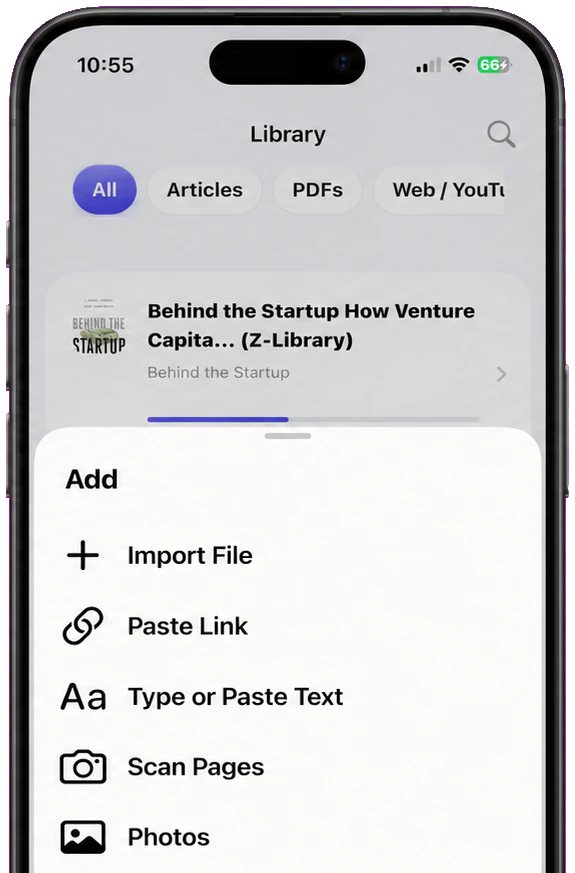
Its core path is local-first: supported import and text handling, speech generation, and playback occur on the iPhone. First voice setup needs internet to obtain the required resources; normal core playback can then continue offline. Free supports up to 10 saved items. Lifetime Offline covers unlimited eligible local reading features. Pro adds document-grounded cloud summaries, chat, and optional sync, which use connected services only when selected.
Choose AudioPage when listening and offline privacy matter more than newsletter subscriptions, RSS, social discovery, or deep research integrations. It is not a web crawler, paywall bypass, MP3 exporter, or audiobook publishing studio. The source page must be accessible to you, and extraction still depends on its markup.
The step-by-step webpage read-aloud guide explains Safari and share-sheet routes. If you want to compare the free options before installing anything else, see the free text to speech apps for iPhone guide. For current plan boundaries, use AudioPage purchase support; the site exposes a store button only after the public listing is confirmed.
3. Matter: best modern read-later experience for Apple users
Matter describes itself as a modern read-later app for iPhone, iPad, and web. Its official site and current App Store listing advertise article parsing, newsletters, RSS, PDFs, YouTube and podcast transcripts, highlighting, text-to-speech, exports to knowledge tools, and offline availability.
This breadth makes Matter a fit for someone who wants an elegant reading inbox rather than only a voice player. Time-synchronized transcripts and newsletter handling distinguish it from document-first readers.
Matter offers a free service and Premium. The listing did not present one universal web price in the source checked July 17, so confirm the amount, renewal interval, and included TTS allowance in your storefront. Its cloud inbox and integrations are useful precisely because content is synchronized; readers seeking an entirely device-contained workflow should examine the privacy policy and feature path before importing sensitive material.
4. Instapaper: best straightforward read-later queue
Instapaper has a focused model: save an article from an iPhone app or browser, read a mobile-optimized text view, highlight it, and return later. Its mobile documentation explicitly advertises offline saved reading on iOS and Android.
The current Premium overview lists AI voices and text-to-speech playlists on mobile, full-text search, permanent archive, unlimited notes, and other upgrades. Pricing was $6 per month or $60 per year when checked July 17, 2026.
Choose Instapaper if you want a mature, comparatively simple inbox without the research surface of Readwise Reader. The caveat is feature placement: verify which TTS voice, playlist, archive, or send-to-device behavior is free versus Premium. AI voices can be streaming even when the article text is cached, so run an Airplane Mode test with the exact voice you plan to use.
5. Readwise Reader: best for researchers and highlight workflows
Readwise Reader is closer to a reading operating system. Its official product material covers web articles, email newsletters, RSS, PDFs, EPUBs, video transcripts, highlighting, full-text search, text-to-speech, AI-assisted reading, and export through Readwise to tools such as Obsidian and Notion.
Its official FAQ says the combined Reader and Readwise subscription costs $9.99 per month when billed annually or $12.99 monthly, after a trial. It also documents offline behavior: on mobile, opened documents can cache locally, and selective offline caching lets users choose library sections.
Choose it when your goal is to turn articles into notes and reusable knowledge. It is likely excessive if you only want to press Play on one story. Cloud synchronization, parsing, AI, and exports also create a different data model from a local-only reader. Read the privacy policy and configure integrations deliberately.
6. Speechify: best for platform and voice breadth
Speechify’s official iOS page advertises article and document listening across iPhone, Android, web, and browser extensions, with many voices, speed controls, scanning, and offline downloads for Premium users. That cross-platform surface is valuable when articles arrive on a work computer but listening happens on iPhone.
The July 17 US App Store listing showed a free download and multiple subscription or in-app purchase entries rather than one simple price. Check the final Apple sheet for the exact renewal and plan limits. A large voice catalog should not distract from the extraction test: save one long article with captions, pull quotes, and a subscriber login before purchasing.
If pricing or cloud dependence is your concern, see the source-verified Speechify alternatives.
7. ElevenReader: best for expressive multilingual listening
ElevenLabs says ElevenReader handles articles, EPUBs, PDFs, and other text with its voice technology in 32 languages. It is available on iPhone, iPad, Android, and web, with iOS 17 or later required according to its help center.
Choose it when voice expression and multilingual breadth outweigh read-later organization or local-only processing. The ElevenLabs help center said the reader was currently free on July 17, 2026. That is a dated status, not a promise that cloud usage will always remain unlimited or free.
Check how the app imports the publications you read, whether a voice streams, and how it stores source text. A content catalog and publishing platform may be appealing for discovery but is a different product shape from a private offline article queue.
A 20-minute article-reader test
Use four pages you are authorized to access:
- a clean public essay with headings and images;
- a news page containing navigation, related stories, and an email signup;
- a subscriber article while you are signed in;
- a recipe or reference page with a table and numbered steps.
For each app, record:
| Test | Pass condition |
|---|---|
| Save | The correct title, author, and full permitted text appear |
| Cleanup | Menus, cookie banners, and recommendations are excluded |
| Structure | Headings, captions, lists, and steps remain in order |
| Playback | Speed, skip, highlight, and lock-screen controls work |
| Resume | Reopening returns to the same paragraph or audio position |
| Offline | The chosen article and voice play for two minutes in Airplane Mode |
| Source | A working link back to the publisher remains available |
Do not use a single perfectly formatted blog post as the entire test. The difficult page reveals whether the reader fits your real inbox.
Troubleshooting article imports and narration
The share-sheet app is missing
Open the iOS share sheet, scroll to the app row, tap More, and add the reader to Favorites if available. Open the reader once after installation and sign in before retrying. As a fallback, copy the URL and use the app’s add-link field.
Only the headline or preview was saved
The site may render article text after page load, require a login, or block automated parsing. Open the original in Safari, authenticate legitimately, and use a supported logged-in or share workflow. No reader should circumvent a publisher’s paywall.
Menus and related links are narrated
Try Safari Reader or the app’s text/clean view. If clutter remains, copy only the article body into a new reading item when permitted. Report parsing problems to the reader with the exact source URL.
Offline reading works, but the premium voice stops
Cached text and generated speech are separate. A service may store the article locally while streaming its AI voice. Download the required voice or audio where supported, or select a local system/on-device voice.
The app loses the listening position
Pause before force-closing, wait for sync, and reopen on the same device. Check whether the product stores visual scroll and audio position separately. Test this before adding hundreds of articles.
Frequently asked questions
What is the best app for reading articles aloud on iPhone?
Use Safari Listen to Page for occasional supported pages, AudioPage for a local-first listening library, or a read-later service such as Matter, Instapaper, or Readwise Reader when organization and highlights matter.
Can Safari read an article aloud without another app?
Yes. On a supported webpage, open the Page Menu and choose Listen to Page. Safari Reader can also remove navigation and other distractions on supported articles.
Can an article reader bypass a paywall?
No legitimate reader should bypass publisher access controls. Sign in to a subscription you own, save through a supported logged-in workflow, or use the publisher’s authorized app or feed.
Which article reader works offline on iPhone?
Safari can use downloaded Apple voices, AudioPage’s core listening works locally after first voice setup, and Matter, Instapaper, and Readwise Reader describe offline reading or caching. Test the exact article and voice before travel.
What happened to articles saved in a reader if the original page changes?
It depends on the service. Some readers retain a parsed copy, while others refresh or link to the source. Keep critical research, citations, and permitted copies in a system you control.
Sources and further reading
- Apple Support: Listen to a webpage in Safari on iPhone (checked 2026-07-17)
- Apple Support: Hide distractions with Safari Reader (checked 2026-07-17)
- Matter (checked 2026-07-17)
- Matter on the US App Store (checked 2026-07-17)
- Instapaper Docs: Premium overview (checked 2026-07-17)
- Instapaper Docs: Mobile apps (checked 2026-07-17)
- Readwise Reader (checked 2026-07-17)
- Readwise Reader FAQs (checked 2026-07-17)
- Speechify for iOS (checked 2026-07-17)
- ElevenLabs Help: What is ElevenReader? (checked 2026-07-17)
- AudioPage Support (checked 2026-07-17)
About AudioPage Editorial
Guides are produced by the team building AudioPage. Product claims are checked against the current app and repository; third-party features and prices are checked against official sources on the date shown. Read our editorial standards and corrections policy.
Turn the next document into listening time
AudioPage keeps core reading local-first on iPhone. Review the current plan boundaries, then choose the listening setup that fits your documents.